
1
Upload the PDF you already use
Start with your invoice template, certificate, form, label sheet, or any PDF layout that needs repeated data.
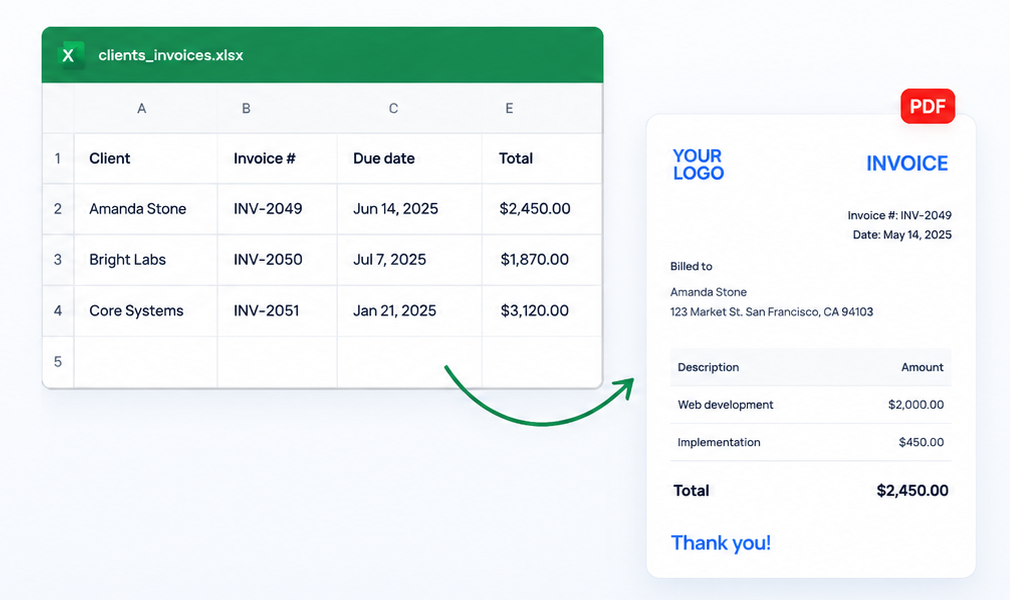
Your own templateCSVLink is for the copy-paste work that happens after your spreadsheet is ready. Upload a PDF template, import Excel or CSV, drag columns like Date, Customer, Amount, or Invoice # onto the page, and generate one filled PDF for each row.
Most people use it for invoices, but the same workflow works for receipts, certificates, labels, packing slips, reports, letters, and any document where the layout stays the same but the data changes.
No code, no Word mail merge, and no copying the same values into a PDF over and over.
Start with your invoice template, certificate, form, label sheet, or any PDF layout that needs repeated data.
Your own templateCSVLink lists the columns from your Excel or CSV file. Drag each column to the exact place it should print.
Visual mappingIf your file has 10 rows, you get 10 finished pages. If it has 500 rows, you generate the whole set at once.
Ready to print or sendYou may already have the perfect spreadsheet: customer names, invoice numbers, prices, dates, addresses, order IDs, or certificate names. The painful part is getting that data into a clean PDF layout without rebuilding every document by hand. CSVLink turns that spreadsheet into printable PDF documents while keeping your layout intact.
The best use cases are documents where the format stays the same and the values change from row to row.
Turn customer, date, item, tax, and total columns into clean PDF invoices without entering the same data twice.
Bring your own branded invoice PDF, place fields once, and use it every time you need to print a billing run.
Generate receipts from payment IDs, customer names, dates, amounts, balances, and notes.
Drop names, course titles, dates, signer names, and awards into a certificate PDF for every person on a list.
Use SKUs, product names, prices, categories, descriptions, and barcodes from a spreadsheet to prepare label PDFs.
Fill client reports, letters, internal forms, cover sheets, packing slips, and other repeatable PDFs from structured data.
Export the invoice information you need from QuickBooks as Excel or CSV, upload it to CSVLink, and place those columns on your invoice PDF. This is helpful when QuickBooks stores the data, but you want the printed invoice to follow your own layout, language, branding, or format.
Download an invoice list, sales report, customer report, or the spreadsheet your team already uses.
Match customer, invoice number, date, line item, amount, tax, and total to the places they belong on the PDF.
Download one merged file for printing or a ZIP with individual PDFs for sending and archiving.
Invoices are the obvious starting point, but the template system is flexible enough for other documents your business repeats every week.
Create invoice PDFs from customer, date, line item, tax, and total columns in your spreadsheet.
Turn customer, item, quantity, price, and expiration columns into consistent quote PDFs.
Use product names, SKUs, prices, categories, and descriptions from Excel or CSV to generate label files.
Generate packing slips from order IDs, recipients, addresses, item names, quantities, and shipping notes.
Create personalized certificates from names, dates, programs, awards, and signer fields in a spreadsheet.
Design your own layout, connect it to spreadsheet columns, and export one personalized document per row.
Stop opening a PDF, copying a value from Excel, saving, duplicating, and repeating the same work for every row.
Use the exact PDF template your clients, vendors, school, or internal team already recognizes.
The PDF is filled from your spreadsheet values, so names, dates, invoice numbers, and totals stay consistent.
Save a mapping once and use it again for the next month, next class, next order run, or next client report batch.
Open a template, replace the sample branding, link your spreadsheet, and export a full document run without starting from scratch.
Start free while you test the workflow. Upgrade when you need more saved templates, larger runs, and production exports.
Good for testing a real PDF and spreadsheet before committing.
For businesses that generate documents often.
Best value if CSVLink becomes part of your normal workflow.
CSVLink is closest to a visual PDF mail merge: your spreadsheet supplies the values, and your PDF supplies the layout.
Yes. Upload an Excel file, choose the columns you need, place them on the PDF, and generate one filled PDF per row.
Yes. Upload your own invoice PDF and place fields like customer, date, invoice number, items, tax, and total exactly where you want them.
Yes. CSVLink supports CSV as well as Excel files, so you can use exports from accounting tools, ecommerce platforms, CRMs, or your own spreadsheets.
No. Invoices are the most common use case, but any repeatable PDF can work: receipts, certificates, packing slips, labels, letters, forms, and reports.
Use these pages when you need a more specific workflow, like Excel to invoice, CSV to invoice, QuickBooks exports, or custom PDF documents.
Use a spreadsheet as the data source and your PDF as the design.
Turn spreadsheet rows into polished invoices without repetitive copy-paste.
Use CSV billing data to generate branded PDF invoices.
Generate a high-volume invoice batch from structured rows.
Build or import a reusable invoice layout before mapping spreadsheet fields.
Use the same Excel-to-PDF workflow for documents beyond invoices.
Export QuickBooks invoice data and print it in your own PDF template.
Map grouped rows into repeated line items for detailed invoices.
A practical guide for cleaning data and exporting invoice PDFs.